
Manage Reservation & Sponsorship Levels
Once your reservation and sponsorship levels are created, you can manage their order, visibility, and details directly from the Reservation & Sponsorship Levels page.

Below the add buttons you will see
View Your Levels
Levels are displayed in two sections:
- Sponsorship Levels (top section)
- Reservation Levels (bottom section)
View Level Details
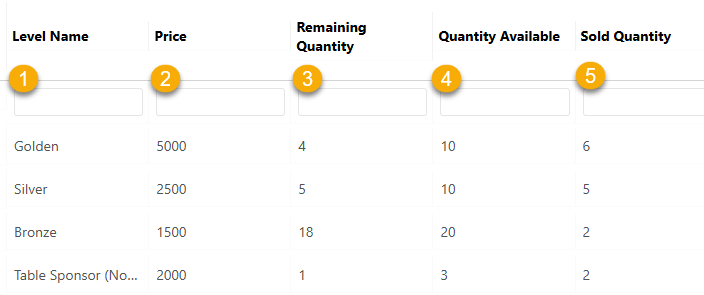
The level list provides a quick overview of each reservation and sponsorship level.
For each level, you can view:
- Level Name: The name of the reservation or sponsorship level
- Price: The cost of the level
- Remaining Quantity: How many are still available for purchase
- Quantity Available: The total number originally set for the level
- Sold Quantity: The number of levels that have already been purchased
💡 Good to Know
- Remaining Quantity is automatically calculated based on total available minus sold
- Manual additions from the dashboard are included in the sold count
- This view helps you quickly track availability and prevent overselling
Reorder Levels

- Click and hold the drag icon
- Move the level to the desired position
Edit a Level

- Click the Edit (pencil) icon next to the level
- The form will populate with existing details
- Make your changes
- Click Save
Delete a Level

- Click the Trash icon next to the level
⚠️ Important
- If a level has already been sold you will not be able to delete it
- Use Hidden instead
Manage Visibility

You can control how levels appear on the ticketing page:
- Hidden – Removes the level from public view
- No Longer Available – Displays the level but prevents purchase
💡 Good to Know
- You can update levels at any time
- Reservation and sponsorship levels are displayed separately
- Inventory is tracked across both online and manual entries
⚠️ Important
Always click Save after creating or editing a level.